




Displaying top page
This section explains the how to display Web Printing Tool.
 Start your Web browser.
 Enter "http://(machine's address)/webprint/index.html" in the address bar of a Web browser.
Top Page of Web Printing Tool appears.
If the machine's host name has been registered on the DNS or WINS server, you can enter it.
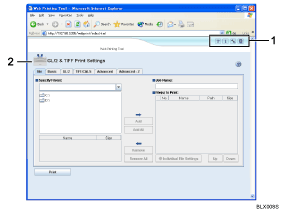
Header area
The area at the top of the Web Printing Tool page is called the header area. The following items appear in the header area.

[Help] button
Click to display Help.

[Version Information] button
Click to display Web Printing Tool versition information.

[GL/2 & TIFF Initial Configuration] button
Click to display the [GL/2 & TIFF Initial Configuration] page.

[System Log] button
Click to display the [System Log] page.
GL/2 & TIFF Print Settings
The area at the top of the Web Printing Tool page is the GL/2 & TIFF Print Settings area.

To open the [GL/2 & TIFF Initial Configuration] or [System Log] page, you must enter the administrator password.
For details, see Web Printing Tool's Help.

