




PDF Direct Print Properties
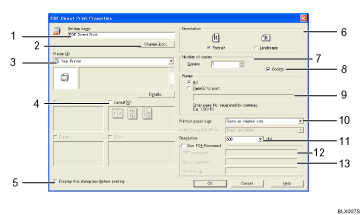
Setting name:
Displays the plug-in configuration name (up to 63 single byte characters)
Change Icon...
Changes the icon displayed on the tool bar.
Printer:
Displays a list of RPCS drivers that support PDF direct printing.
Layout
Prints multiple pages on a single sheet.
Display this dialog box before printing
Appears in PDF direct printing mode if this check box is selected.
Orientation:
Specify the original's orientation.
Number of copies
Specify the number of copies to print.
Collate
Sorts printed sheets.
Range:
Specify which paper to print.
Printout paper size:
Specify the paper size you want copies to be printed onto.
Resolution:
Specify a print resolution.
PDF password:
Enter the password for password-protected PDF files. A password-protected PDF file cannot be printed unless its password is entered here.
Group password:
If a group password is assigned to DeskTopBinder Lite and this machine, enter the group password in this field. The group password must be entered for printing to start.

