












 Manuals
 Contents
 Previous
 Next
Next


| | | |
| |||
| |||
| | | |
| ManualsContentsPreviousNext | | |
This section provides explanations about external options.
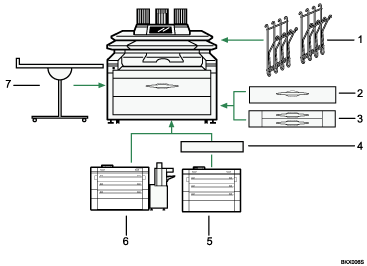
Original hanger
Stack originals here before copying or scanning them.
Lower tray (paper roll tray)
You can load two paper rolls.
Cut paper trays
Load cut paper here.
You can load up to 250 sheets of A2 size paper for each.
Bridge Unit
Relays copies to the folding finisher.
Fan Folding Finisher
Automatically folds paper like fans or accordion.
Cross Folding Finisher
The machine rotates fan-folded copies to further fold them in half or into thirds.
Multi Stacker
Attach this to the front or back of the machine.
You can stack a large number of copies on it.
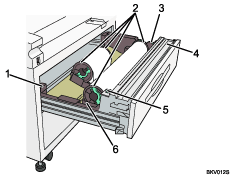
Anti-humidity heater switch
When humidity is high, paper in the paper tray may absorb moisture, which can affect copy quality. The anti-humidity heater prevents this.
Turn this switch on when humidity is high.
Paper holder
The two paper holders grip the paper roll and are mounted on the paper roll tray's roll holder.
Paper feed knob
Use when loading paper rolls or clearing paper jams.
Cutter knob
Use to manually cut paper if there are paper jams in the cutter area of the machine. Always return the cutter knob to the left or right end.
Auto feed button
Use this to clear misfeeds in the paper feed area. Keep this button pressed to feed the roll paper continuously.
When approximately 100 mm, 3.9" of paper length is fed, release the button so that paper will be cut automatically.
Roll holder
Adjust this to the size of the paper roll you are using.
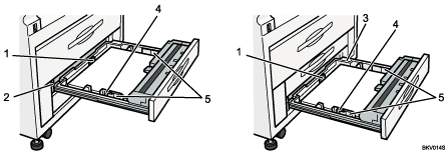
Back fence
Adjust to the paper length.
Anti-humidity heater switch
When humidity is high, paper in the paper tray may absorb moisture, which can affect copy quality. The anti-humidity heater prevents this.
Turn this switch on when humidity is high.
Side guide pocket
Use the side guide inside here to align translucent paper. Keep covered when not in use.
Side lever
Use to fix the position of the side fences.
Side fences
Adjust to the paper width.

Some options cannot be installed on the machine if certain other options already installed. For details about which options can be used in combination, contact your sales or service representative.
 |
 | Copyright (C) 2008 |
