












 Manuals
 Contents
 Previous
 Next
Next


| | | |
| |||
| |||
| | | |
| ManualsContentsPreviousNext | | |
Specify the horizontal and vertical lengths of the original and copy image.
Copies can be reduced or enlarged at different reproduction ratios horizontally and vertically.
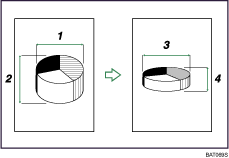
Horizontal original size: A mm (inch)
Vertical original size: B mm (inch)
Horizontal copy size: a mm (inch)
Vertical copy size: b mm (inch)
Measure and specify the lengths of the original and copy by comparing "A" with "a" and "B" with "b".
Press [Reduce / Enlarge].
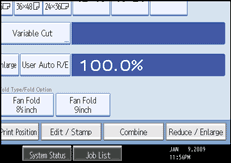
Press [Dir. Size Mag. mm].
Enter the horizontal size of the original with the number keys, and then press [ ].
].
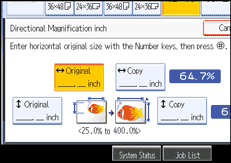
Enter the horizontal size of the copy with the number keys, and then press [].
Enter the vertical size of the original with the number keys, and then press [].
Enter the vertical size of the copy with the number keys, and then press [].
Press [OK] twice.

To change the value you entered, press the key you want to change, and then enter a new value.
You can specify a paper size of 1 - 9999 mm (0.1" - 99.9") vertically and 1 - 914 mm (0.1" - 36") horizontally in units of 1 mm (0.1").
 |
 | Copyright (C) 2008 |
