












 Manuals
 Contents
 Previous
 Next
Next


| | | |
| |||
| |||
| | | |
| ManualsContentsPreviousNext | | |
Top Page > Copy/Document Server Reference > Advanced Copying > Advanced Reduce/Enlarge Copying > Directional Magnification (%) > Specifying the ratio with [ ] and [
 ]
]
] and []Specify a ratio using [] and [].
Press [Reduce / Enlarge].
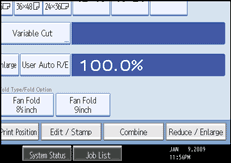
Press [Direct. Mag. %].
Press [[] [] keys].
Press [Horizontal].
Adjust the ratio using [] and [].
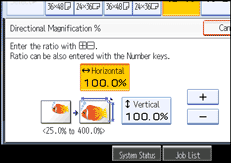
Pressing [] or [] changes the ratio in increments of 0.1%. Pressing and holding down [] or [] changes it in increments of 1%.
Press [Vertical].
Adjust the ratio with [] and [].
Press [OK] twice.

To change the value you entered, readjust it with [] and [].
 |
 | Copyright (C) 2008 |
