












 Manuals
 Contents
 Previous
 Next
Next


| | | |
| |||
| |||
| | | |
| ManualsContentsPreviousNext | | |
When placing custom size originals, specify the size of the originals.
Press [Special Original].
Press [Custom Size Original].

Enter the horizontal size of the original with the number keys, and then press [ ].
].
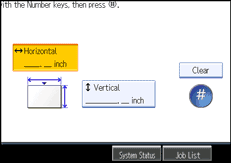
Enter the vertical size of the original with the number keys, and then press [].
Press [OK].

On the Type 1, originals that are 182 - 15,000 mm (7.17" - 590.5") vertically and 210 - 914 mm (8.27" -35.9") horizontally can be specified using this function.
On the Type 2, originals that are 182 - 30,000 mm (7.17"-1181.1") vertically and 210 - 914 mm (8.27" -35.9") horizontally can be specified using this function.
If you do not specify the size, parts of the image may not be copied.
If you make a mistake, press [Clear], and then enter the value again.
 |
 | Copyright (C) 2008 |
