












 Manuals
 Contents
 Previous
 Next
Next


| | | |
| |||
| |||
| | | |
| ManualsContentsPreviousNext | | |
The function items displayed serve as selector keys. You can select or specify an item by lightly pressing them.
When you select or specify an item on the display panel, it is highlighted like  . Keys appearing as
  cannot be used.
Initial copy display
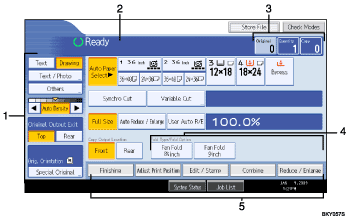
Use this area to specify the original type, original orientation, image density level, and other settings.
Displays operational status and messages.
Displays the numbers of originals scanned, copies set, and copies made.
Use this area to select the fold function and related options.
Displays available functions. Press a function to display its menu.
 |
 | Copyright (C) 2008 |
