












 Manuals
 Contents
 Previous
 Next
Next


| | | |
| |||
| |||
| | | |
| ManualsContentsPreviousNext | | |
Select [Own Name] using [ ] or [
 ], and then press the [OK] key.
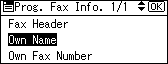
Enter the own name, and then press the [OK] key.
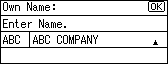
To change the programmed Own Name, press the [Clear/Stop] key, and then enter again.

You can register "Own Name" using up to 20 alphanumeric characters and symbols.
For details about entering text, see "Entering Text", About This Machine.
 |
 | Copyright (C) 2008 |
