












 Vejledninger
 Indhold
 Forrige
 Næste
Næste


| | | |
| |||
| |||
| | | |
| VejledningerIndholdForrigeNæste | | |
Åbn efterbehandlerens frontlåge.
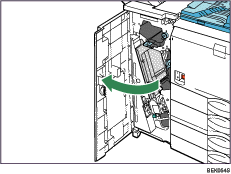
Løft hæfteenheden.
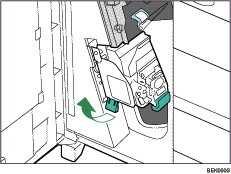
Hold og løft håndtaget på patronen, og træk patronen forsigtigt ud af hæfteenheden.

Løft patronens frontlåge.

Hold patronens beskyttelsesstang opad, og fjern de fastklemte hæfteklammer
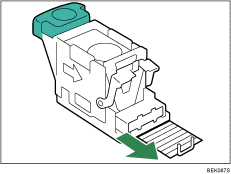
Sæt beskyttelsesstangen tilbage på plads.
Sørg for, at den klikker ordentligt på plads.
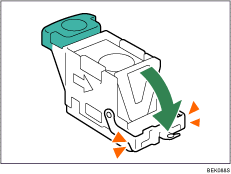
Skub forsigtigt patronen ind i hæfteenheden, indtil den klikker på plads, ved at holde i patronens håndtag.
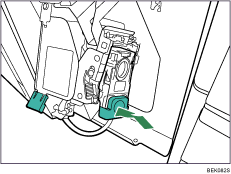
Sæt hæfteenheden tilbage til dens oprindelige position.
Luk efterbehandlerens frontlåge.
 |
 | Copyright (C) 2008 |
