




Changing the Security Options Menu
Follow the procedure below to erase data inside memory.
 Press the [Menu] key.
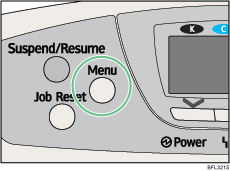
The menu screen appears.
 Press [
 ] or [
 ] key to select [Security Options], and then press the [OK] key.
 Press [] or [] key to select [Extended Security], and then press the [OK] key.
 Press the [] or [] key to select [Erase All Memory], and then press the [OK] key.
 Press the [] or [] key to select [On], and then press [Erase No].
 Press the [] or [] key to enter overwrite times, and then press the [OK] key.
 Press the [] or [] key to select [On], and then press the [OK] key.
Wait for one second. The [Security Options] menu appears.
 Press the [Menu] key.
The initial screen appears.

