












 Manuals
 Contents
 Previous
 Next
Next


| | | |
| |||
| |||
| | | |
| ManualsContentsPreviousNext | | |
When you access the printer using a Web Image Monitor or IPP, you can establish encrypted communication using SSL.
When you access the printer using an application such as SmartDeviceMonitor for Admin, you can establish encrypted communication using SNMPv3 or SSL. To protect data from interception, analysis, and tampering, you can install a server certificate in the printer, negotiate a secure connection, and encrypt transmitted data.

You must install one of the following memory options to perform encryption:
the hard disk
the data storage card
SSL (SSL (Secure Sockets Layer)Secure Sockets Layer)
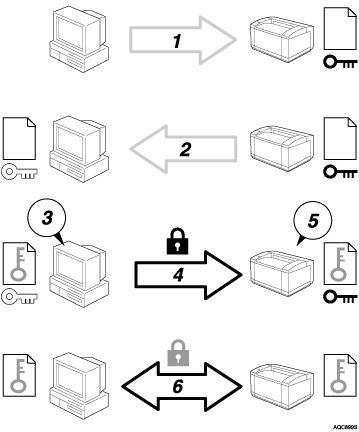
To access the printer from a user's computer, request for the SSL server certificate and public key.
The server certificate and public key are sent from the printer to the user's computer.
Create shared key from the user's computer, and then encrypt it using public key.
The encrypted shared key is sent to the printer.
The encrypted shared key is decrypted in the machine using private key.
Transmit the encrypted data using the shared key, and then decrypt the data at the machine to attain secure transmission.
 |
 | Copyright (C) 2008 |
