












 Manuals
 Contents
 Previous
 Next
Next


| | | |
| |||
| |||
| | | |
| ManualsContentsPreviousNext | | |
You can embed a pattern by setting it in the printer driver.
Setting [Data security for copying] in the printer driver
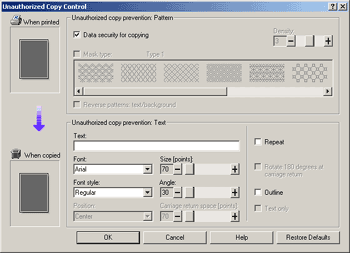
Select the [Data security for copying] checkbox. You can also enter the text in the [Text:] box.
You cannot select the [Mask type:] checkbox at the same time.
To print a document protected by gray overprint, the printer must be set up correctly. Consult an administrator.
Printing a document using [Data security for copying]
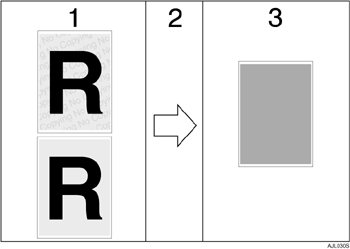
The pattern and text you have set is printed.
The document is copied in copiers/multifunction machines which the supplier's optional Copy Data Security unit is installed.
The document is blanked by gray overprint.

When printing a document that is set with [Data security for copying], the printer does not require the optional Copy Data Security unit to be installed. The Copy Data Security unit is required when copying or storing a document protected by gray overprint.
Only the RPCS printer driver is supported.
You cannot partially embed a pattern and text in a document.
Use 182 × 257 mm (71/4×101/2 in.) or larger paper.
Use ordinary or recycled paper of at least 70% whiteness.
Duplex printing may interfere with this function as a result of text and patterns being visible through the paper.
The optional Copy Data Security Unit is for the supplier's copiers/multifunction machines. It cannot be installed on this printer.
For details about setting [Data security for copying], see the printer driver Help.
 |
 | Copyright (C) 2008 |
