












 Manuals
 Contents
 Previous
 Next
Next


| | | |
| |||
| |||
| | | |
| ManualsContentsPreviousNext | | |
If the paper feed roller is dirty, a misfeed might occur. In this case, clean the roller as follows:

When lifting the printer, use the grips on both sides of the printer, otherwise the printer might fall and cause personal injury.
When you move the printer, unplug the power cord from the wall outlet to avoid a fire or an electric shock.
When you pull out the plug from the socket, grip the plug to avoid damaging the cord and causing a fire or an electric shock.

If the printer is equipped with the optional paper feed unit, do not move the printer and unit together as they are not securely attached.
When lifting the printer, confirm that the optional paper feed unit is not attached to the printer.
Do not use chemical cleaner or organic solvent such as thinner or benzine.
Do not slide the paper tray in with force. If you do, the front and side guides might move.
Turn off the power.
Pull out the plug from the socket. Remove all the cables from the printer.
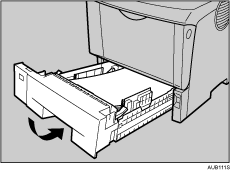
Pull out the paper tray until it stops.
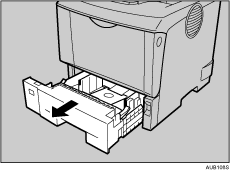
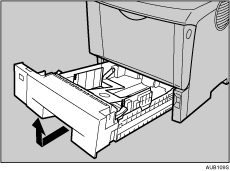
Lift the front side of the tray, and then pull it out of the printer.
Move the printer to the edge of a stable table or desk.
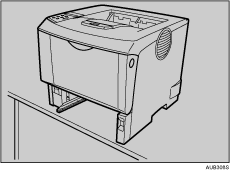
Do not put the printer on an unstable or tilted surface.
Slide the green lock lever to the left ( ), so that the paper feed roller can be released (
 ).
).
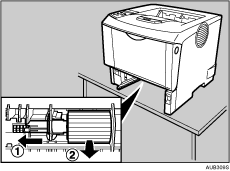
Wipe the rubber part of the roller with a soft damp cloth. Then, wipe it with a dry cloth to remove the water.
While sliding the green lock lever to the left (), set the paper feed roller to its original position (). After that, return the green lock lever to its original position ( ).
).
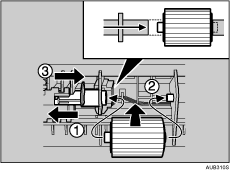
Check the green lock lever secures the roller correctly by making sure the new roller rotates smoothly.
Move the printer to the place where it was placed. Carefully slide the paper tray into the printer until it stops.

Follow the same procedure to clean the paper feed roller of the optional paper feed unit.
 |
 | Copyright (C) 2008 |
