












 Manuals
 Contents
 Previous
 Next
Next


| | | |
| |||
| |||
| | | |
| ManualsContentsPreviousNext | | |
Improve printer performance by selecting the optimum paper type for the tray. You can select from the following paper types:
Plain Paper, Recycled Paper, Special Paper, Color Paper, Letterhead, Preprinted, Thick Paper
You can select custom paper type settings made using Web Image Monitor.

Be sure to set a paper type using the control panel of the printer as the following procedure. If you set a paper type only by the printer driver, printing result might not be appropriate.
Press the [Menu] key.
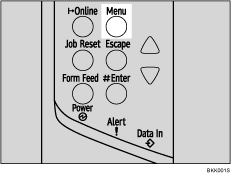
The [Menu] screen appears.
Press the [ ] or [
 ] key to display [Paper Input], and then press the [
 Enter] key.

Press the [] or [] key to display [Paper Type], and then press the [ Enter] key.
Press the [] or [] key to select the tray, and then press the [ Enter] key.

Press the [] or [] key to select the paper type, and then press the [ Enter] key.

Press the [Online] key.
The initial screen appears.

The following paper types cannot be printed on both sides:
Special Paper, Color Paper, Preprinted, Thick Paper
 |
 | Copyright (C) 2008 |
