




Cleaning the Friction Pad
If the friction pad is dirty, a multi-feed or a misfeed might occur. In this case, clean the pad as follows:

Do not use chemical cleaner or organic solvent such as thinner or benzine.
Do not slide the paper tray in with force. If you do, the front and side guides might move.
 Pull out the paper tray until it stops.
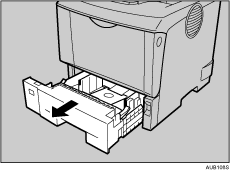
 Lift the front side of the tray, and then pull it out of the printer.
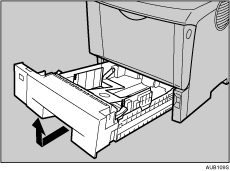
 Place the tray on a flat surface. When there is paper in the tray, remove paper.
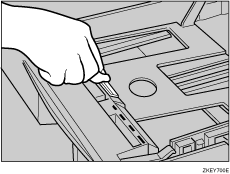
 Wipe the friction pad with a soft damp cloth. Then, wipe it with a dry cloth to remove the water.
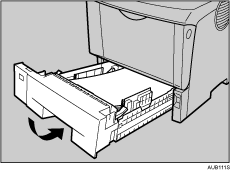
 Load paper into the paper tray with the print side up. Carefully slide the paper tray into the printer until it stops.

If misfeeds or multi-feeds of paper occur after cleaning the friction pad, contact your sales or service representative.
Follow the same procedure to clean the friction pad of the optional paper feed unit and the envelope feeder unit.

