




Setting SSID
To use wireless LAN, set SSID for transmission. Consult your network administrator for the SSID to use.
 In the [IEEE 802.11b] menu, press the [
 ] or [
 ] key to display [SSID], and then press the [
 Enter] key.
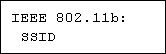
If an SSID has been set, you can check the SSID setting.
 Press the [] or [] key to display [Enter ID], and then press the [ Enter] key.
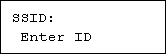
 Press the [] or [] key to enter characters, and then press the [ Enter] key.
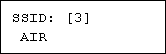
The number of characters you have entered is displayed on the top right of the screen.
The characters that can be used are ASCII 0x20-0x7e (32 bytes), 16 digits.
 Print a configuration page to confirm the settings made.

SSID can also be set using a Web browser. For details, see the Web Image Monitor Help, and "Configuring the Network Interface Board", Software Guide.
WEP key can also be set using a Web browser. For details, see Web Image Monitor Help.
For details about printing the configuration page, see "Printing the Test Page", Quick Installation Guide.

"Configuring the Network Interface Board", Software Guide
"Printing the Test Page", Quick Installation Guide
Web Image Monitor Help

