




Tab Stock
Prints on tab stocks.
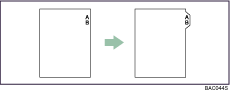

Make sure to install the optional tab sheet fence when setting tab stocks. Contact your service representative regarding the optional tab sheet fence installation.
Only tab stocks with the tab on the right (at the top part of the paper) can be printed on.
For details about tab stocks size that can be printed, see "System Settings", General Settings Guide.
For details about printing method, see the printer driver Help.

Make sure to check the position of the tab beforehand, so that images to be printed do not come out slanted. If there are any letters in a position where the tab is not present, toner may dirty the back of the paper.
If there are any inconsistencies between the position of the tab, the staple and the punch hole, the tab position will be prioritized.

