




Paper Misfeed Message (A)
The “ A Open the part as shown and remove paper.” error message appears when a paper misfeed occurs in the paper feed section.

The inside of this printer becomes very hot. Before removing paper around the fusing unit, wait until the temperature of the covers inside the fusing unit and duplex unit cool down.
When a paper misfed (A) occurs, the paper tray is locked and cannot be pulled out. Do not forcefully pull out the tray.
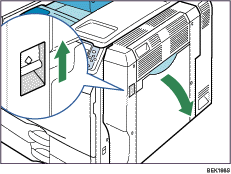
 Push up the lever on the right side, and open the printer's right cover carefully.
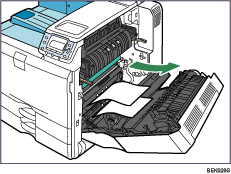
 Remove misfed paper slowly.
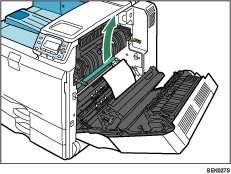
 If the paper cannot be removed, open the bypass tray and pull it out slowly.
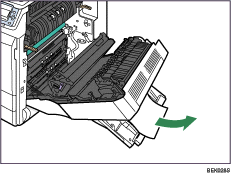
 Remove the paper slowly from the bypass tray.
 Carefully close the right cover.
 Carefully close the bypass tray.

