




Adding Toner

Do not incinerate spilled toner or used toner. Toner dust is flammable and might ignite when exposed to an open flame.
Disposal should take place at an authorized dealer or an appropriate collection site.
Dispose of used toner containers in accordance with local regulations.

Keep toner (used or unused) and toner containers out of reach of children. If a child swallows toner, consult a doctor immediately.
If toner or used toner is inhaled, gargle with plenty of water and move into a fresh air environment. Consult a doctor if necessary.
If toner or used toner gets into your eyes, flush immediately with large amounts of water. Consult a doctor if necessary.
If toner or used toner is swallowed, dilute by drinking a large amount of water. Consult a doctor if necessary.
Avoid getting toner on your clothes or skin when removing a paper jam or replacing toner. If your skin comes into contact with toner, wash the affected area thoroughly with soap and water.
If toner gets on your clothing, wash with cold water. Hot water will set the toner into the fabric and may make removing the stain impossible.
Our products are engineered to meet high standards of quality and functionality. When purchasing expendable supplies, we recommend using only those specified by an authorized dealer.
Do not open toner containers forcefully. Toner can spill, dirtying your clothes or hands, and possibly resulting in accidental ingestion.

When removing toner, be careful not to drop it.
Do not forcefully push toner in.
When handling toner, never stand them up on either end or position them upside down.
Store toner in a cool dark place.
Toner is a consumable and not covered by warranty. If there is a problem, contact the store where it was purchased.
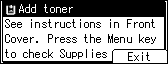
Replace the toner when the following message appears on the display:
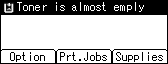
When the following message appears on the display, the toner should be replaced soon. Prepare a new toner.
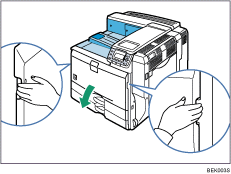
 Holding the left and right side grips, carefully open the front cover.
 Turn the green handle counterclockwise until it clicks into place.
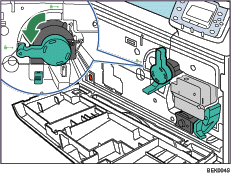
 Pushing the green locking lever down, pull out the toner holder carefully by the handle until it stops.
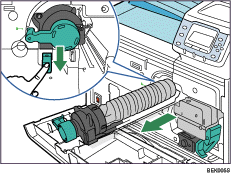
 Slide the toner slightly towards the printer, raise its top, and then take it out of the holder carefully.
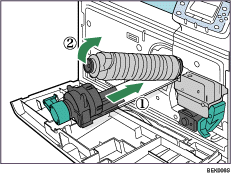
Do not shake the removed toner. Any remaining toner may leak.
Pull the toner out carefully to prevent leakage.
Place the used toner on paper or some other material to avoid dirtying your workspace.
 Take the new toner out of the box.
 Shake the new toner back and forth five or six times.
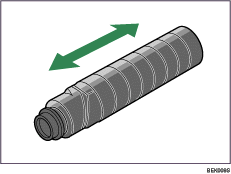
Even distribution of toner improves print quality.
 Remove the black cap of the new toner by turning it counterclockwise.
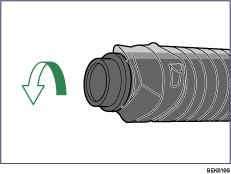
Do not shake or jar the toner after removing the black cap as toner can scatter easily.
 Put the toner onto the toner holder in angle (
 ), place it flat on the toner holder, and then slide it towards you to secure it in place (
 ).
).
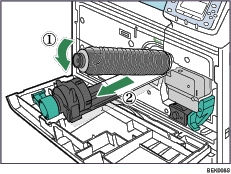
 Push the toner holder back in carefully until it clicks into place.

Do not push in and remove the holder repeatedly. Doing so results in toner leak.
 Turn the green handle clockwise until it clicks into place.
Confirm that the holder is secured with the green locking lever.
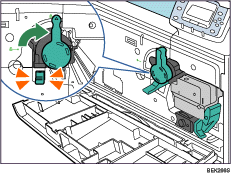
 Carefully close the front cover.
Wait until “Please wait.” disappears from the display.

Cooperate with the Toner Recycling Program, whereby are collected used toner. For details, consult with the dealer where you purchased the printer, or with a sales or service representative.

