




Attaching the Paper Feed Unit
This section describes how to attach the 1000-sheet paper feed unit or 2000-sheet paper feed unit to the printer. The procedure is the same for both units. The 1000-sheet paper feed unit is used as an example.

The printer weights approximately 73 kg (161 lb.).
Four or more people are required to move the printer. Hold the handles located on both sides, and then lift it slowly. Lifting it carelessly or dropping it may cause an injury.
It is dangerous to handle the plug with wet hands. Doing this may result in receiving an electric shock.
Before moving the machine, unplug the power cord from the outlet. If the cord is unplugged abruptly, it could become damaged. Damaged plugs or cords can cause an electrical or fire hazard.

When attaching multiple options, attach the paper feed unit first.
Either the 1000-sheet paper feed unit or 2000-sheet paper feed unit can be attached, but not both.
When the 1000-sheet paper feed unit or the 2000-sheet paper feed unit is attached, you can also attach the 1200-sheet paper feed unit. To attach the 1200-sheet paper feed unit, contact your sales or service representative.
Before using the new paper feed unit, you must configure settings in the printer driver.
 Check the contents of the package.
For 1000-sheet paper feed unit:
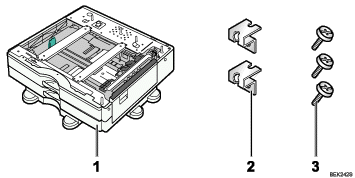
1000-sheet paper feed unit
Two Brackets
Three Screws
For 2000-sheet paper feed unit:
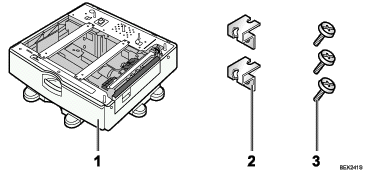
2000-sheet paper feed unit
Two Brackets
Three Screws
 Turn the printer off and unplug the power cord.
 Remove the packaging from the paper feed unit.
 Pull out the handle from the right side of the printer.
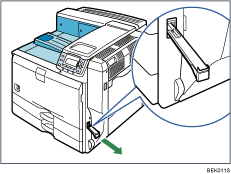
 Lift the printer using the handles on both sides.
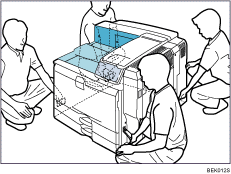
The printer should always be lifted by at least four people.
 Align the front of the printer with the front of the paper feed unit, and slowly lower it.
Place it so that it is held firmly in place by the vertical pins.
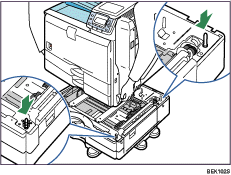
Return the handle you pulled out from the printer to its original position.
 Pull out tray 2 of the printer slowly until it stops, lift the front of the tray slightly, and then pull out the tray completely.
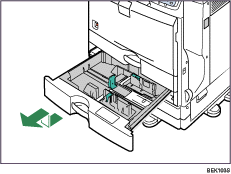
Place the tray on a flat surface.
 Attach a screw in the hole on the left side of the tray opening to secure the printer to the paper feed unit.
Tighten the screw firmly using a coin.
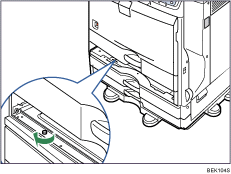
 Lift the front of the tray, and slide it carefully into the printer until it stops.
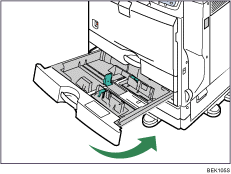
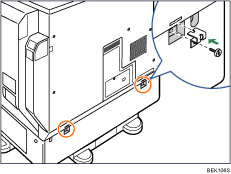
 On the rear of the unit, attach two brackets using the remaining screws.
Tighten the screws firmly using a coin.
 Plug in the power cord, and then turn on the printer.
 Print the configuration page to confirm that the unit was attached correctly.

To confirm whether the optional paper feed unit was correctly attached, print the configuration page, and check "Attached Equipment" on the configuration page. If the unit was attached correctly, the following will be displayed:
1000-sheet paper feed unit: Lower Paper Trays
2000-sheet paper feed unit: Tray 3
If the optional paper feed unit was not installed properly, repeat the procedure from step 2. If it cannot be installed correctly even after reattempting installation, contact your sales or service representative.
If the print area is not centered correctly, see "Adjusting Printing Position".
For information about printing the configuration page, see "Test Printing", Quick Installation Guide.


