






Replacing the Ink Collector Unit

|

|
Replace the ink collector unit when the following message appears on the control panel:
The following message appears when the ink collector unit is full.
| *Warning* Ink Collector Full |
| *Warning* Replace Ink Collectr |
Ink can spill when the ink collector unit is removed. Cover nearby surfaces with paper or similar.
 Turn off the machine's power.
 Take the new ink collector unit out of the box.
 Carefully open the machine's rear side left cover.
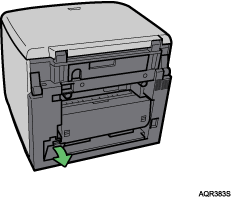
 Put on both supplied gloves, and then slide the full ink collector unit carefully out, keeping it level.
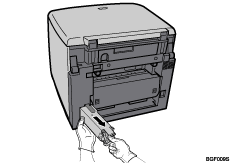
Pull out while pressing the area marked “Push”.
 Taking care not to spill any waste ink, carefully put the old ink collector unit into the supplied plastic bag.
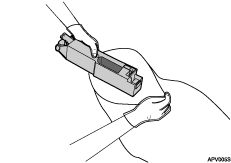
Take care not to drop the plastic bag when the old ink collector unit is inside it. The bag might tear, causing ink to spill.
 Slide the new ink collector unit carefully into the machine, until you hear it click.
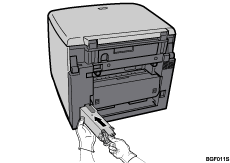
Make sure the ink collector unit is fully inserted. If it is not, ink will leak inside the machine.
 Carefully, close the machine's rear side left cover.
 Switch on the machine's power.
 The “Ink Collector Full” message is still displayed, so reset the machine using the following steps.
| *Warning* Ink Collector Full |
| *Warning* Replace Ink Collectr |
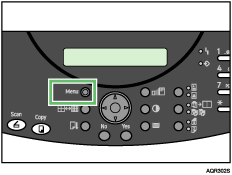
 Press the [Menu] key.
 Press the [
 ] or [
 ] key to display [Engine Settings], and then press the [Yes] key.
| Engine Settings ? OK=Yes / or 1-8 |
 Press the [] or [] key to display [Replce InkCollct], and then press the [Yes] key.
| 7 Replce InkCollct OK=Yes |
The following message appears:
| Overflow may occur if Unit is |
| not replaced. Reset counters? |
 Press the [Yes] key.
When the new ink collector unit is reset, the following message appears:
| Reset complete Power Off/On |
 Turn off the machine's power, and then turn it back on.
If the “Ink Collector Full” message is still displayed, repeat the replacement procedure from step , taking care to properly insert the unit.
| *Warning* Ink Collector Full |
| *Warning* Replace Ink Collectr |

The sensor inside the ink collector unit has an LED that contains trace quantities of gallium arsenide. Dispose of the ink collector unit in accordance with local regulations or consult a waste disposal agent.

