












 Contents
 Previous
 Next
Next


| | | |
| |||
| |||
| | | |
| ContentsPreviousNext | | |
Do the following before relocating the printer inside the same room.

The machine weighs around 13 kg (28.7 lb.).
To avoid injury to self and damage to the machine, lift the machine slowly and carefully by gripping the central areas near the base on both sides.
Careless handling and over exertion when lifting can result in breakage and/or injury.

Be sure to keep the printer level. If it is unduly tilted, ink will leak from the ink collector.
Turn the power off, disconnect the USB cable, or ethernet cable, and then unplug the power cord from the wall outlet.
Before moving the printer, be sure to disconnect the power cord from the printer, too.
Lift the printer and move it to the place where you want to install it.
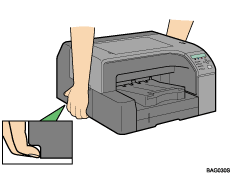
Grip the indented area at the base of the printer's sides, as shown. Lift and carry the printer slowly and carefully.
Make sure the power cord is not trapped under the printer.
 |
 | Copyright (C) 2007 |
