












 Contents
 Previous
 Next
Next


| | | |
| |||
| |||
| | | |
| ContentsPreviousNext | | |

The machine weighs around 13 kg (28.7 lb).
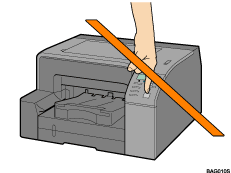
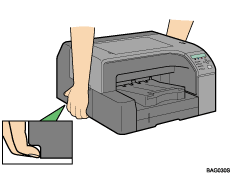
To avoid injury to self and damage to the machine, lift the machine slowly and carefully by gripping the central areas near the base on both sides.
Careless handling and over exertion when lifting can result in breakage and/or injury.

Do not turn the machine on until you have read how to do so.
Open the box and take out all supplied items. Check that all the following items are present:
Power Cord
Starter cartridge - Cyan
Starter cartridge - Magenta
Starter cartridge - Yellow
Starter cartridge - Black
Quick Installation Guide
Safety information
CD-ROM; User Guide is included on this.
Take off the protective covering.
Remove the plastic bag.
Lift the printer and move it to the place where you want to install it.
Grip the indented area at the base of the printer's sides, as shown. Lift and carry the printer slowly and carefully.
Remove the orange tape from the printer body.

We recommend you keep the box, so you can use it again when relocating the printer.
Remove all the orange tape, except the tape around the power cord.
USB and LAN cables are not supplied.
 |
 | Copyright (C) 2007 |
