






Displaying the Counter
You can display the counter.
Press the [Menu] key.
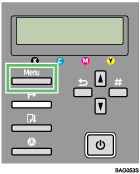
Press [
 ] or [
 ] to display [Counter], and then press the [#Enter] key.
Menu:
CounterPress [
] or [] to display [Show Counter], and then press the [#Enter] key.Menu:
Show CounterChecks the [Color] and [Black] on the display.
Color: 12345678
Black: 12345678Press the [Online] key.
The operating screen appears.

